 Ollo
OlloHome / Safety
Safety at Ollo
Safety is built into every trip — from the code that starts it to the team you can reach with one tap, day and night.
In an emergency, call 999 (police), 112 (all services) or 1199 (ambulance) first, then press SOS in the app.

Before you get in
Know it's your ride
Ollo drivers use their own cars and bikes and don't wear Ollo uniforms, so the app tells you exactly who is coming.
Number plate
The surest check. The plate on the car must match the plate in the app, letter for letter.
Car photo, make, model and colour
You see a photo of the actual car, plus its make, model and colour, as soon as a driver accepts.
Driver photo, name and rating
Check the face behind the wheel matches the photo in the app.
Live map
Watch the car come to you on the map, with a live arrival time.
If anything doesn't match, don't get in. Cancel the ride and report it from Support in the app.
During the trip
The trip can't start until you say so
4-digit pickup code
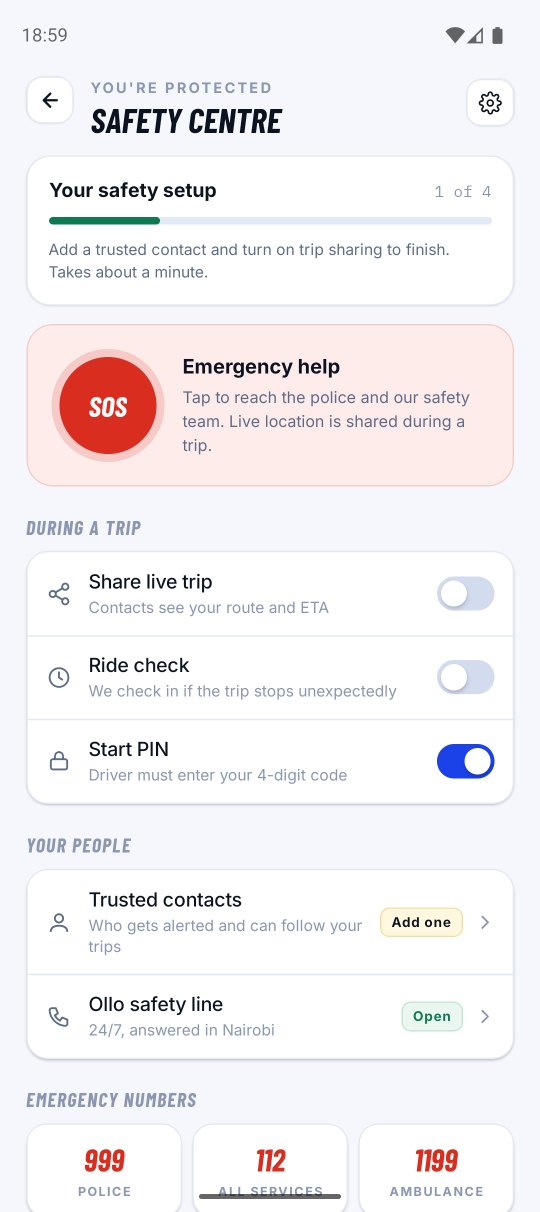
Read it to the driver once you're in. The trip can't start until they enter it — so you never board the wrong car, and no driver can start a trip you're not in. It's on by default — it appears as “Start PIN” in the Safety centre. Keep it on.
Share your trip live
Send a link by WhatsApp or SMS. Family can follow your car on a map without installing the app.
We check in if you stop
If a trip hasn't moved for a long time, the app asks whether you need help. Answer “I need help” and the Ollo safety team is alerted straight away. Normal traffic jams are taken into account.
If something's wrong
SOS, one tap away
The SOS button is on the ride screen for the whole trip.
- The Ollo safety team is alertedWith your live location, the driver and the trip details.
- Your emergency contacts are notifiedAdd them in the app under Account → Safety → Emergency contacts.
- Sound is recorded for the safety teamIf you've allowed the microphone, the app records the sound around you until you mark yourself safe, for up to 5 minutes. Only the Ollo safety team can listen to it.
Everything is in one place under Account → Safety centre: SOS, trip sharing, Start PIN, trusted contacts, the 24/7 Ollo safety line and Kenya's emergency numbers. For anything else, open Support → Create New Ticket, pick the ride and attach a photo if it helps. Support is available 24/7 and replies arrive in your Inbox.
Our drivers
Checked before their first trip, and every day after
Documents checked
National ID, driving licence, PSV badge, certificate of good conduct, KRA PIN, vehicle insurance, inspection certificate and logbook — reviewed by the Ollo team before a driver can go online.
Kept current
Expiry dates are tracked. When a driving licence, insurance or inspection certificate expires, the driver can't go online until the renewal is approved.
A selfie every day
Drivers take a selfie each day before going online, and the Ollo team checks it against their approved photo — so the person driving is the person we approved.
Ratings both ways
Riders and drivers rate every trip, and the Ollo team reviews feedback.
Fraud stays out
Accounts removed for fraud or false documents can't simply sign up again.
Boda safety
Always wear a helmet
Kenyan law requires a helmet for every boda passenger. Ask your rider for one before you get on. Bike and Electric Bike trips use the same pickup code, live tracking and SOS as a car.
For drivers
Safety works both ways
The pickup code proves the right rider is in your car and protects you if a trip is disputed. You rate every rider, and the check-in reaches you too. Read the driver safety guidelines.